Chris Lattner on the Apple Dev Forums: We care a lot about the pain that is affecting you now, and Xcode 6.1.1 available now as a GM Seed should address the worst of the SourceKit, DerivedData and module cache issues (among other bugs). It has been wonderful to see Chris Lattner (father of Swift)… Read more of Apple Releases Xcode 6.1.1 GM →
This makes so much sense. The idea isn’t neccesarily brand-new, (here’s an article from back in 2009), but seeing it illustrated as clearly and beautifully as Evan has done here is eye opening. Read more of Coding in Color →
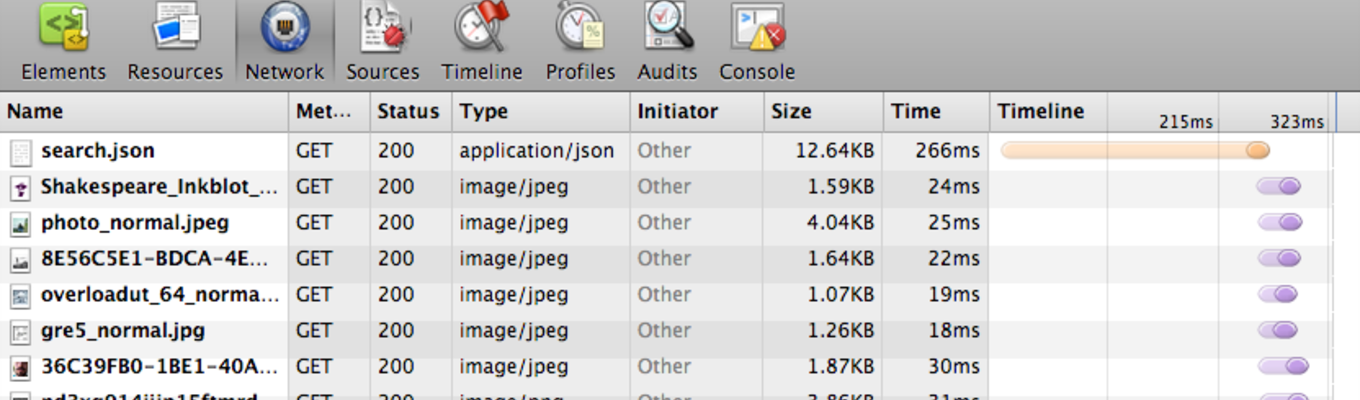
The team at @Square have released another amazing tool for native iOS development. PonyDebugger is a remote debugging toolset. It is a client library and gateway server combination that uses Chrome Developer Tools on your browser to debug your application’s… Read more of Change Your Debugging Life With PonyDebugger →
Oh man, I have waited a long time for a tool like this to come around. I’ve even attempted to build one myself a couple times. The process of localizing Cocoa applications has always been a bit of a chore. Various tools are available to facilitate localization of applications, but they all require… Read more of Localize Your Apps With Ease Using Greenwich →
Building iOS and Mac projects from the command-line could be a lot easier to work with. Hopefully this post will give you a couple ways to make that happen. I wanna talk about two different little tools that help ease the process of scripting or working with Xcode projects from the command line… Read more of Building Xcode Projects from the Command Line →
How many times has this happened to you? I received the new mobileprovision file. Great. No. What? You still haven’t added my UDID in it. I have. No you have not. Yes I have. No you haven’t. Yes. No! Why don’t you just… … Look, I’m sure. Can you generate it again? Ok, I will. Wait… ok, it’s done… Read more of QuickLook Plugin for Mobile Provision Files →
Zucchini is an awesome cucumber-like visual testing framework for iOS. It works in a pretty awesome way by compiling CoffeeScript down to UIAutomation-compliant Javascript, and then running the test with Instruments.app’s command-line tool. Also, As their site describes further, the whole system… Read more of Zucchini: iOS Testing Written in Ruby & CoffeeScript →
A brilliant article by my buddy Ted Howard on the trials and tribulations of properly naming pieces of your user interface. We needed a name for the button that brought up the stack editor. We wanted to convey to the user that launching the editor was a safe operation, that any changes they made… Read more of Connect, Discover, Edit, Inspect, Customize →
Hiedi Utley has completely brought the awesome with a way to use desktop Safari’s WebKit inspector to debug iOS UIWebView objects: Wow! What a day! While researching debugging techniques for an upcoming training class I am teaching on PhoneGap, I stumbled over a couple of blogs about a private API… Read more of Remote Debugging UIWebView →
A fantastic little OS X app here for configuring CSS gradients. The interface of Gradient is really fantastic and pretty close to perfect of this simple task. This image was hosted on CloudApp, which shut down. It’s gone. You simply choose your color, and generate the CSS. It has all sorts of… Read more of Gradient.app →
Fabien Sanglard brings us an extremely comprehensive guide to getting the recently open-sourced Doom 3 source code up and running on OS X using Xcode 4. Love it: This image was hosted on CloudApp, which shut down. It’s gone. Read more of Compiling Doom 3 in Xcode 4 →
Yes. This is so helpful it’s not even funny. This little baby comes to us thanks to Wade Cosgrove. A custom color picker designed specifically for developers. Makes getting colors out of Photoshop/Acorn mock-ups quick and easy. Currently supports NSColor, UIColor, CGColorRef, CSS and HTML styles… Read more of Developer Color Picker →
Here’s a neat little snippet for Xcode 4 that will cause all of your //TODO: and //FIXME: comments in your code to appear as compiler warnings when you build. Here’s how to use it: Instructions Head over to your project’s item in the Project Navigator (usually at the very top) Find your target in… Read more of Show TODO's And FIXME's As Warnings In Xcode →