This post is from 2012, about 14 years ago. Some of it may be out of date.
▸ QuickLook Plugin for Mobile Provision Files
Jake MarshHow many times has this happened to you?
- I received the new mobileprovision file.
- Great.
- No.
- What?
- You still haven’t added my UDID in it.
- I have.
- No you have not.
- Yes I have.
- No you haven’t.
- Yes.
- No! Why don’t you just…
- …
- Look, I’m sure. Can you generate it again?
- Ok, I will. Wait… ok, it’s done.
- Let me check. No, sorry, still not ok.
- Are you sure? [END OF CHAT CONVERSATION CENSORED]
MacMotion brings something to relieve the pain (slightly) of dealing with Apple Provisioning Profiles, and it uses one of my favorite OS X features, QuickLook.
After installing MacMotion’s new QuickLook plugin Simply press the spacebar on any .mobileprovision file in the finder and instead of some boring 1 line summary, you’ll get something like this:
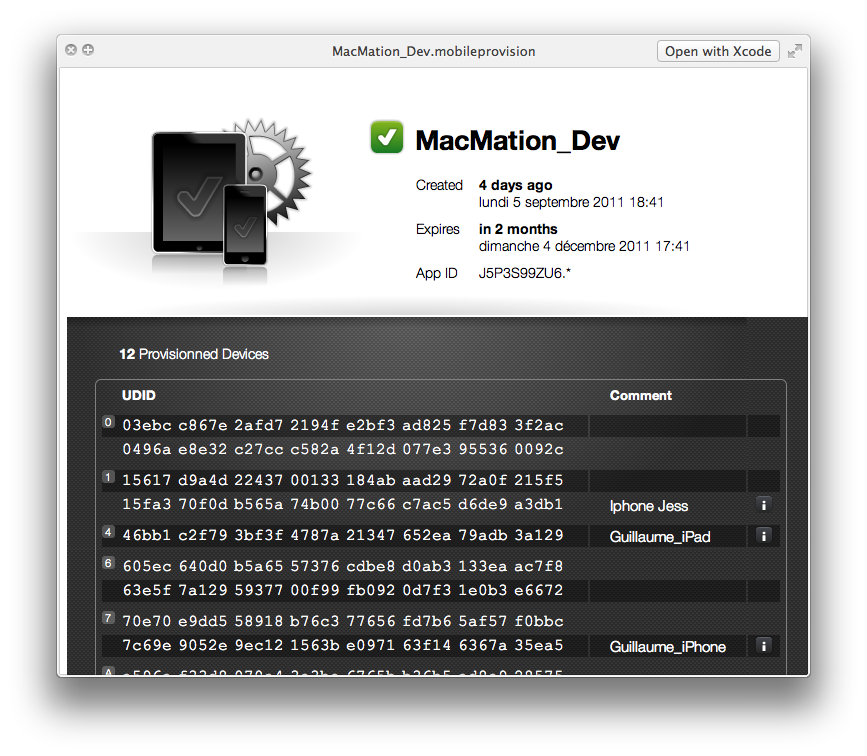
It also has some great enhancements to Finder icons to quickly tell you if a profile is valid or not.
You can download the plugin here (at the bottom of the post).
Link: www.macmation.com/blog/2011/10/quicklook-plugin-for-mobile-provision-files