---
title: "Rendering Social Carousels As Video With Remotion"
url: https://deallocatedobjects.com/posts/rendering-social-carousels-as-video-with-remotion
author: Jake Marsh
published: 2026-11-20
updated: 2026-11-20
topics: ["This Blog", "Web"]
description: "Each post on this blog gets a short carousel on Threads and X: four or five slides with the main idea and usually a code sample or a table. They used to be PNGs. Now every slide is a little video where the words come in one at a time, rendered with Remotion from a TypeScript file per post."
---
# Rendering Social Carousels As Video With Remotion
By Jake Marsh, November 20, 2026. HTML: https://deallocatedobjects.com/posts/rendering-social-carousels-as-video-with-remotion
Each post on this blog gets a short carousel on Threads and X: four or five slides with the main idea and usually a code sample or a table. They used to be PNGs. Now every slide is a little video where the words come in one at a time, rendered with [Remotion](https://www.remotion.dev) from a TypeScript file per post.
Here's slide 2 from the carousel for [Why du Overcounts On APFS](https://deallocatedobjects.com/posts/why-du-overcounts-on-apfs):
### One File Per Carousel
A carousel is plain data. There are four kinds of block a slide can hold: a paragraph, a code panel, a three-column table, and a big number that counts from one value to another.
```ts title="reels/src/carousel/types.ts"
export type Block =
| { type: "p"; text: string }
| { type: "code"; lines: string[]; size?: number }
| { type: "rows"; rows: [string, string, string][] }
| { type: "count"; from: number; to: number; unit: string; label: string };
export type Slide = {
tone?: "blue" | "white";
kicker: string;
title: string; // on screen from frame 0, so thumbnails aren't blank
big?: boolean; // h1 size
blocks: Block[];
};
```
Each post gets a file in `reels/carousels/` named after its slug. The `folder` is where the finished videos go, and `satisfies Carousel` means a typo in a block type fails before anything renders:
```ts title="reels/carousels/why-du-overcounts-on-apfs.ts"
export default {
slug: "why-du-overcounts-on-apfs",
folder: "2026-11-13-du-apfs",
caption: "Chrome keeps 14 copies of itself in a temp folder on my Mac, ...",
slides: [
{ tone: "blue", big: true, kicker: "Deallocated Objects", title: "Why du overcounts on APFS", blocks: [{ type: "p", text: "Clones share their blocks, and du counts every one in full." }] },
{ kicker: "The test", title: "Three clones, 92 KB", blocks: [
{ type: "code", lines: ["$ cp -c original.bin copy1.bin", "$ cp -c original.bin copy2.bin", "$ cp -c original.bin copy3.bin", "$ du -sh .", "1.0G ."], size: 34 },
{ type: "p", text: "A 256 MB file and three clones moved free space by 92 KB. A plain cp took 257 MB." },
] },
// ...three more slides
],
} satisfies Carousel;
```
Backticks inside paragraph text become little code chips, so I can write "`gzip_static` follows `gzip_proxied`" and the slide styles it the way the blog does.
### Timing Comes From The Words
Nothing in the carousel file says how long a slide lasts. A `timeline()` function works it out from the content. Paragraphs reveal at 14 words a second, a counter takes 36 frames, and there's a 6-frame gap after each block. Then it estimates how long a person needs to read everything on the slide at 3.6 words a second and holds the slide that long:
```ts title="reels/src/carousel/types.ts"
export const FPS = 30;
/** Word reveal 14/s, counters 36 frames; code and tables are on screen from frame 0. */
export function timeline(slide: Slide): { blocks: Timed[]; animFrames: number; totalFrames: number } {
let t = 8;
let readWords = words(slide.title) + words(slide.kicker);
const blocks: Timed[] = slide.blocks.map((b) => {
const start = t;
let frames = 0;
let w = 0;
if (b.type === "p") { w = words(b.text); frames = Math.ceil((w / 14) * FPS); }
if (b.type === "code") { w = b.lines.join(" ").split(/\s+/).length; frames = 0; } // shown from frame 0
if (b.type === "rows") { w = b.rows.length * 4; frames = 0; } // shown from frame 0
if (b.type === "count") { w = 6; frames = 36; }
readWords += w;
t += frames + 6;
return { start, frames, words: w };
});
const animFrames = t + 12;
const read = Math.ceil((readWords / 3.6) * FPS) + 30;
return { blocks, animFrames, totalFrames: Math.max(animFrames + 45, read, 4 * FPS) };
}
```
`animFrames` is how long the motion takes, and `totalFrames` is how long the finished video runs. They're very different numbers. Slide 2 above animates for 73 frames, about 2.4 seconds, and the video runs 13.8 seconds. Every slide also runs at least 4 seconds, so a title slide with one short line doesn't flash by.
### The Remotion Side
There's one composition, 1080 by 1350 at 30 fps. That's a 4:5 portrait frame. The duration comes from the props through `calculateMetadata`, so each slide renders exactly as many frames as its animation needs:
```tsx title="reels/src/carousel/index.tsx"
const Root: React.FC = () => (
({ durationInFrames: timeline((props as any).slide).animFrames })}
/>
);
```
The slide component is ordinary React. Each paragraph splits into words, and each word fades in and rises 16 pixels, starting 1/14 of a second after the one before it:
```tsx title="reels/src/carousel/Slide.tsx"
const ease = Easing.bezier(0.2, 0.8, 0.2, 1);
const inOut = (f: number, start: number, len = 9) => interpolate(f, [start, start + len], [0, 1], { extrapolateLeft: "clamp", extrapolateRight: "clamp", easing: ease });
// inside Para:
{tokens.map((w, i) => {
const o = inOut(frame, t.start + (i / 14) * 30);
return (
...
);
})}
```
The fonts are Source Sans 3 and JetBrains Mono, loaded with `@remotion/google-fonts`, the same two the blog uses. The footer shows the domain on the left and "swipe →" on the first slide or "2 / 5" on the rest.
### Rendering Only The Moving Part
`bun reels/render-carousel.ts ` does the whole thing. It bundles the Remotion project once, then for each slide writes the props to a JSON file and renders against the bundle:
```ts title="reels/render-carousel.ts"
const raw = join(out, `raw-${n}.mp4`);
run(remotion, ["render", bundle, "carousel-slide", raw, `--props=${propsFile}`, "--codec=h264", "--crf=16", "--concurrency=4", "--log=error"]);
```
That raw render only covers `animFrames`. The long hold at the end is the last frame repeated, and there's no reason to make Remotion draw the same frame a few hundred times. ffmpeg's `tpad` filter clones the last frame for however long the hold needs to be:
```ts title="reels/render-carousel.ts"
const holdSec = ((tl.totalFrames - tl.animFrames) / FPS).toFixed(2);
// -t, not -shortest: -shortest cuts the output before tpad's held frames are written.
run("ffmpeg", ["-y", "-loglevel", "error", "-i", raw, "-f", "lavfi", "-i", "anullsrc=r=44100:cl=stereo",
"-vf", `tpad=stop_mode=clone:stop_duration=${holdSec},scale=out_range=tv,format=yuv420p`,
"-t", (tl.totalFrames / FPS).toFixed(3), "-c:v", "libx264", "-crf", "20", "-preset", "medium",
"-color_range", "tv", "-r", String(FPS), "-c:a", "aac", "-b:a", "64k", "-movflags", "+faststart", final]);
```
For the du carousel that meant Remotion rendered 354 frames and ffmpeg wrote 1,536.
A few other things happen in that pass. It adds a silent stereo AAC track from `anullsrc`. It converts the color range: ffprobe reports the raw Remotion file as `yuvj420p` with `color_range=pc`, and the finished slide as `yuv420p` with `color_range=tv`. And `+faststart` moves the index to the front of the file so playback can start before the whole thing downloads.
The comment about `-t` explains a trap. `anullsrc` never ends, so something has to stop the output, and `-shortest` sounds like the right tool. It cuts the file off before `tpad` has written the held frames, though. Passing the exact duration with `-t` gets the whole hold.
### One Joined File For X
Threads takes a carousel of videos, so each `slide-NN.mp4` goes up as its own item. For X I post one video with every slide in order. Since every slide comes out of the same ffmpeg settings, the concat demuxer can join them without re-encoding:
```ts title="reels/render-carousel.ts"
const list = join(out, "concat.txt");
writeFileSync(list, parts.map((p) => `file '${p}'`).join("\n"));
run("ffmpeg", ["-y", "-loglevel", "error", "-f", "concat", "-safe", "0", "-i", list, "-c", "copy", "-movflags", "+faststart", join(out, "all-slides.mp4")]);
```
`concat.txt` is just a list of absolute paths, one `file '...'` line per slide, and `-safe 0` lets ffmpeg accept absolute paths. For the du carousel the five slides run 6, 13.8, 9.4, 12.7 and 9.4 seconds and weigh 134 to 265 KB each. The joined file runs 51.2 seconds and comes in at 915 KB.
Everything lands in `reels/out/carousels//`, and I copy the finished files into `public/social//threads/` and `public/social//twitter/` so they deploy with the site. From there [Octopost](https://octopost.ink/?ref=deallocated-post) schedules them alongside the post.
### Checking Before Posting
Before anything renders, the script gathers the caption, kickers, titles and paragraph text and runs them through a style check based on the blog's writing rules. Any em or en dash, any word from a short banned list, or anything shaped like "not this, but that" stops the render with a list of problems. Code blocks are skipped, since code is allowed to look however it looks.
After each slide renders, ffmpeg pulls two stills out of it:
```ts title="reels/render-carousel.ts"
run("ffmpeg", ["-y", "-loglevel", "error", "-sseof", "-0.1", "-i", final, "-frames:v", "1", join(out, `slide-${n}-end.png`)]);
run("ffmpeg", ["-y", "-loglevel", "error", "-i", final, "-frames:v", "1", join(out, `slide-${n}-first.png`)]);
```
The end frame shows the finished slide. There's also a `--stills` flag that skips video entirely and renders only the last animated frame of each slide as a PNG, a quick layout check while I'm adjusting text.
### Threads Shows The First Frame
The first version animated everything. Code panels came in line by line, every 6 frames, sliding in from the left. Table rows came in one at a time, every 8 frames. It looked nice in motion.
Then I saw the carousels on Threads. Threads uses each video's first frame as the preview in the carousel, and on frame 0 of a code slide nothing had arrived yet except the title. Here's the first frame of the table slide from the Brotli carousel as it was:
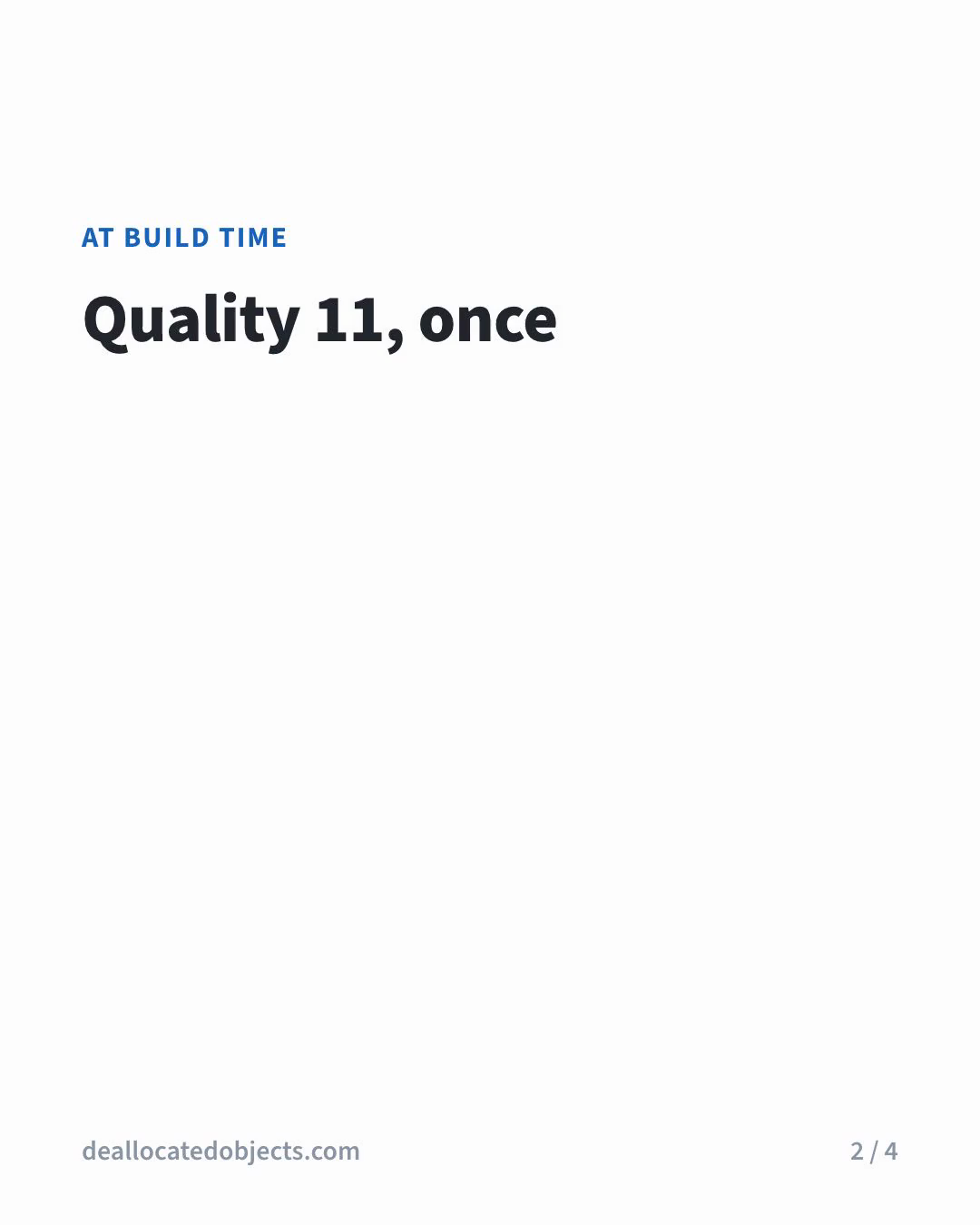
A slide whose whole point is a table of numbers previewed as a heading over empty space. Someone scrolling past had no reason to tap it.
Titles were already on screen from frame 0 for this exact reason, so the fix was to treat code and tables the same way. The code panel lost its per-line fade:
```diff title="reels/src/carousel/Slide.tsx"
- const o = inOut(frame, t.start + i * 6);
- return {l}
;
+ // On screen from frame 0: Threads uses each video's first frame as its preview, and an empty code panel looked broken.
+ return {l}
;
```
Table rows got `const o = 1`, and `timeline()` gave both block types zero animation frames, so a paragraph after them starts 6 frames in instead of waiting for a reveal that no longer happens:
```diff title="reels/src/carousel/types.ts"
- if (b.type === "code") { w = b.lines.join(" ").split(/\s+/).length; frames = b.lines.length * 6; }
- if (b.type === "rows") { w = b.rows.length * 4; frames = b.rows.length * 8; }
+ if (b.type === "code") { w = b.lines.join(" ").split(/\s+/).length; frames = 0; } // shown from frame 0
+ if (b.type === "rows") { w = b.rows.length * 4; frames = 0; } // shown from frame 0
```
The words in the code still count toward the reading time, so the slide still holds long enough to read it. Here's the same slide's first frame after the re-render:
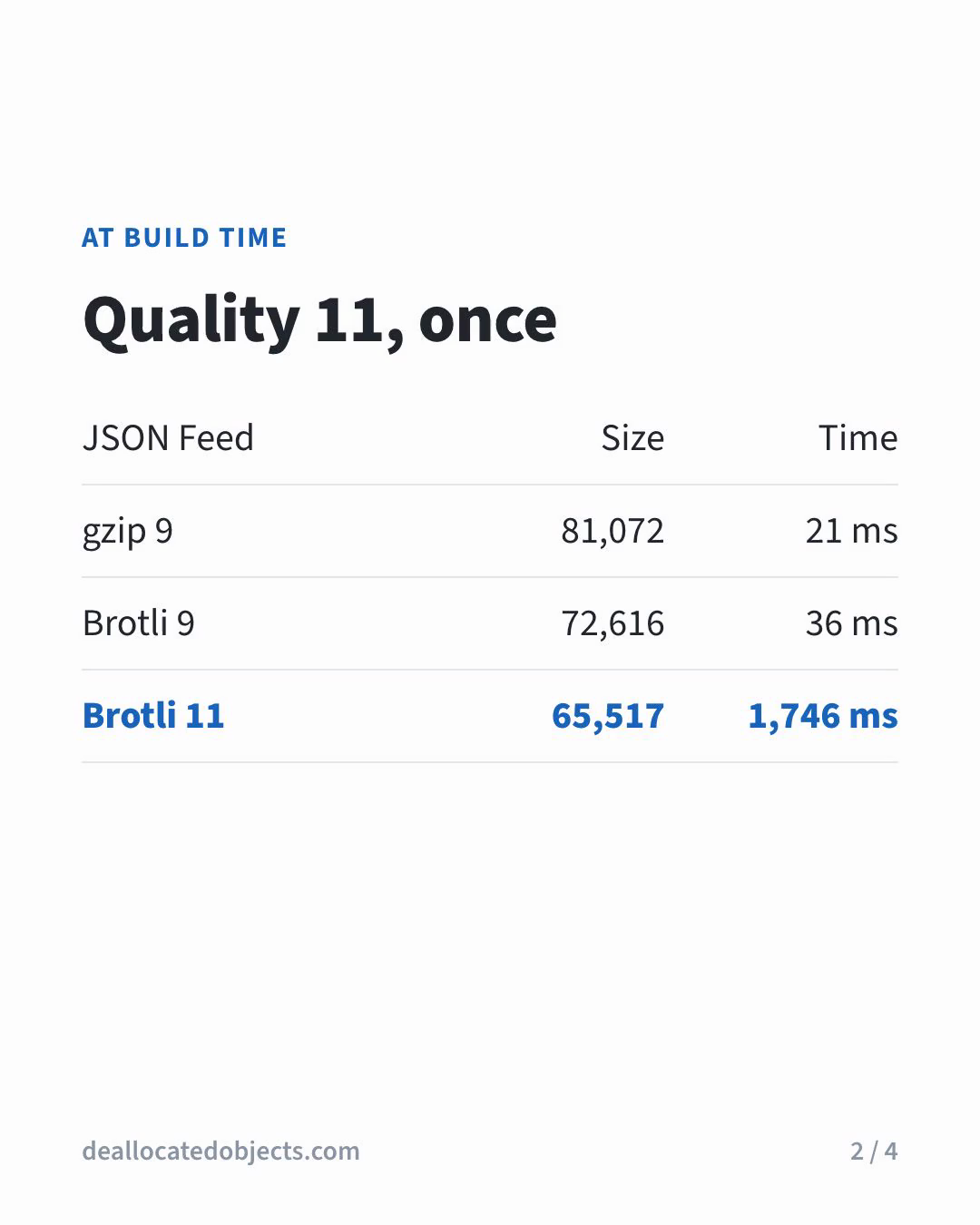
Paragraphs still animate in word by word, and that's fine. A preview with the title and a code panel or table reads as a real slide, and the motion is still there once someone taps in. The `slide-NN-first.png` stills are what I check for this. If the first frame of a slide doesn't make sense on its own, it isn't ready to post.